
Download vidIQ App – YouTube Analytics, Channel Optimization, Video Insights
Overview
The vidIQ App is a desktop software solution designed to assist content creators in managing and optimizing their YouTube channels. Built with the needs of digital creators in mind, the tool provides access to analytics, video insights, and strategic recommendations aimed at improving channel performance. It supports data-driven decision-making by delivering actionable intelligence on content trends, audience behavior, and SEO opportunities. The software is intended for YouTubers, social media managers, and digital marketers who rely on YouTube as a primary platform for content distribution and audience engagement.
While the developer did not provide extensive background on the company’s history or technical infrastructure, the app is positioned as a dedicated utility for YouTube channel growth. Real-world usage scenarios include identifying high-performing video topics, optimizing titles and descriptions for search visibility, monitoring audience retention metrics, and tracking competitor content strategies. The app integrates seamlessly into the workflow of creators who manage multiple channels or seek to scale their content output with precision.
Key Features & Capabilities
- YouTube Analytics Integration – Access real-time channel performance data including views, watch time, subscriber growth, and traffic sources.
- Video SEO Optimization – Receive recommendations for keywords, tags, titles, and descriptions to improve search ranking and discoverability.
- Content Strategy Tools – Analyze trending topics, competitor performance, and audience engagement patterns to inform future content planning.
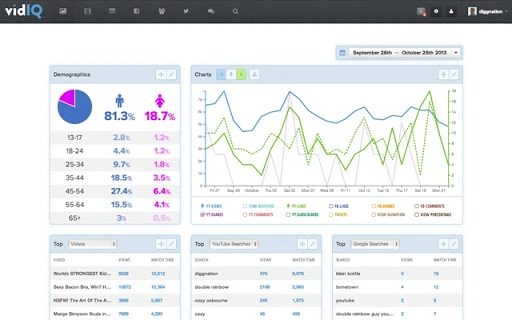
- Channel Performance Dashboard – View a consolidated overview of key metrics across all videos and channels in one interface.
- Insight Alerts – Get notified about sudden changes in performance, new opportunities, or potential issues affecting channel visibility.
These features enable users to shift from reactive to proactive content management. For example, a creator can identify underperforming videos and refine their SEO strategy using suggested keywords. A content team can use the dashboard to prioritize high-potential topics based on audience interest and engagement trends. The tool supports both individual creators and small teams managing multiple channels by centralizing data and streamlining workflow decisions.
User Interface, Workflow & Performance
The user interface of the vidIQ App is designed to present complex data in an accessible and organized manner. Navigation is structured around core sections such as Analytics, Insights, Content Calendar, and Settings, allowing users to quickly switch between functions. The layout emphasizes clarity, with visual charts, progress indicators, and sortable tables to help interpret performance data at a glance.
Workflow efficiency is enhanced through intuitive design patterns, including drag-and-drop functionality for organizing videos and one-click export options for reports. The app appears to support a smooth user experience, though exact performance details were not specified. The developer did not provide information on CPU or RAM usage, nor did they detail startup time or responsiveness under heavy data loads. General software behavior suggests stable operation, but specific benchmarks are unavailable.
Compatibility & System Requirements
The vidIQ App is available for both Windows and Mac operating systems, making it accessible to a broad user base across desktop environments. The software has a file size of 200 MB, indicating a moderate installation footprint. It is compatible with the latest versions of both platforms, though the developer did not specify exact OS versions or hardware requirements.
Exact system requirements were not listed, and compatibility information was partially provided. Users should ensure their system meets standard desktop application demands, including sufficient storage space and a stable internet connection for data synchronization. The developer did not disclose whether the app requires administrative privileges or runs in the background after startup.
Pros and Cons
Pros
- Comprehensive YouTube analytics tailored for channel growth
- Real-time insights for SEO and content optimization
- Intuitive interface designed for creators and marketers
- Supports multiple channels and collaborative workflows
- Free to download and use, with no upfront cost
Cons
- No detailed system requirements provided
- Performance behavior under heavy data loads not disclosed
- Limited information on update frequency and release cycle
- Requires consistent internet connection for full functionality
- Desktop-only availability, no mobile app mentioned
FAQ Section
Is the vidIQ App available for both Windows and Mac?
Yes, the software is compatible with both Windows and Mac operating systems.
Is the app free to use?
Yes, the vidIQ App is available at no cost. There are no subscription fees or hidden charges for core features.
Does the app require an internet connection?
Yes, the app requires a stable internet connection to sync data with YouTube and deliver real-time analytics and insights.
Can I use the app to manage multiple YouTube channels?
Yes, the app supports multiple channel management, allowing users to switch between accounts and monitor performance across different channels.
How often does the app update?
The update schedule was not specified by the developer. Users are encouraged to check the official website or in-app notifications for the latest version.
Final Thoughts + CTA
The vidIQ App stands out as a focused, free desktop tool for creators serious about growing their YouTube presence. Its integration of analytics, SEO guidance, and content strategy support offers tangible value for both beginners and experienced YouTubers. While detailed system specifications and performance metrics are not available, the app’s clean interface and practical features make it a reliable addition to any content creator’s toolkit.
For digital marketers, independent creators, and channel managers, the ability to centralize and act on YouTube data without additional costs is a significant advantage. The lack of technical documentation is a minor drawback, but the app’s core functionality remains robust and purpose-built.
Download vidIQ App now







